
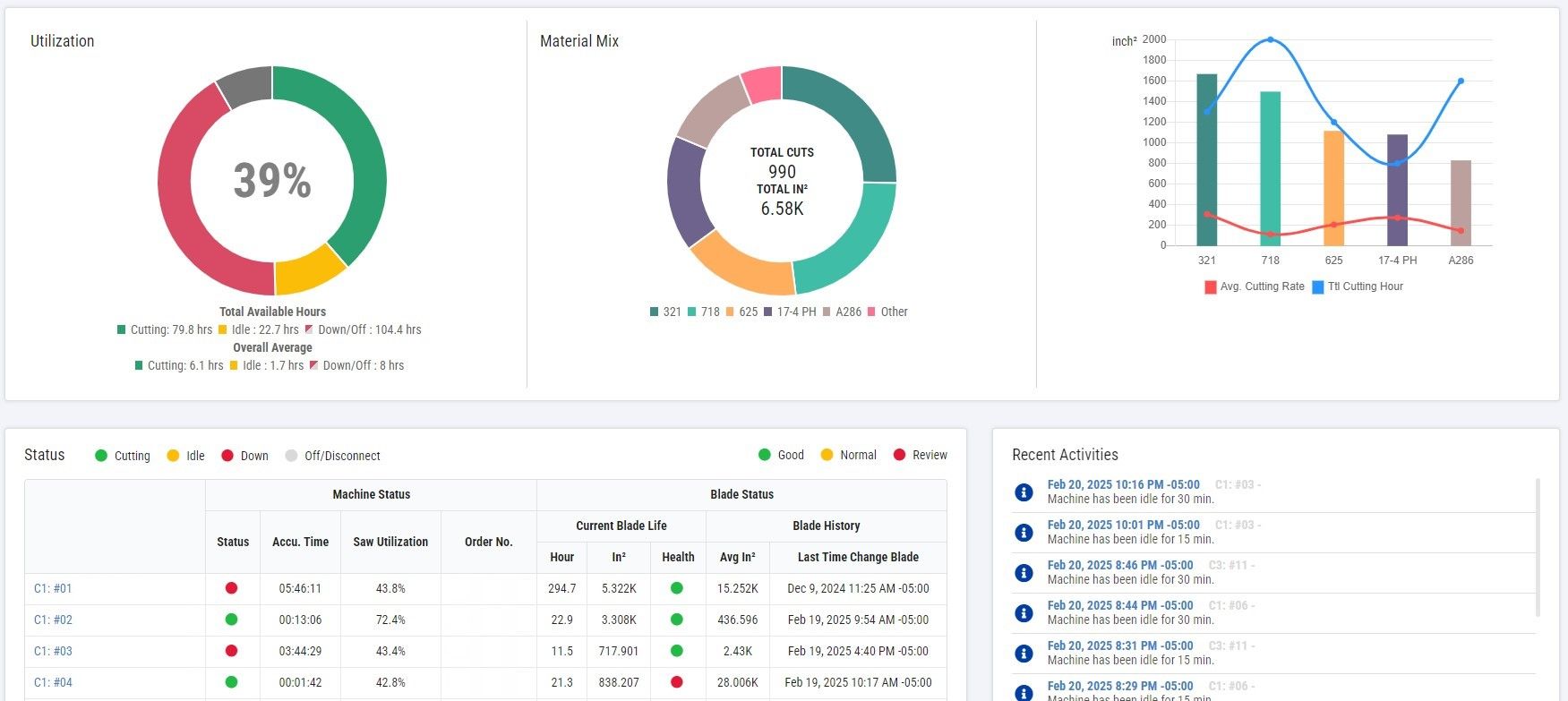
Showing Bandsaw Machine Status on a TV Dashboard
Customize and display important real-time shopfloor information on TV screen
Cosen’s bandsaw machine connectivity service includes TV Dashboard, which allows you to customize and display important machine and production status on one or many TV screens at your desired floor locations. The screen content is customizable via our webpage to show machines in different ways, e.g. by floor location as one example. This makes it super easy for you without having to go through the trouble of creating a separate TV screen.
Band Saw Factory TV Status Dashboard
Walk-Around Visual Management: Spot Anomalies in Seconds on Large Displays to Eliminate Factory Information Blackrooms!
Factory Management Challenges Solved
As manufacturing facilities expand, lacking a centralized large-screen monitoring system causes hidden communication gaps that quietly drain your productivity:
- Information Blackrooms and Invisible Downtime in Expansive Facilities: Business owners and plant managers cannot walk around inspecting every machine continuously. When a machine suddenly trips or an operator temporarily leaves, leaving a band saw idling for an extended period, management remains unaware unless someone manually reports it to the office. These delays accumulate into costly capacity losses and invisible downtime.
- High IT Barriers for Custom TV Dashboard Systems: In the past, deploying a factory-wide TV dashboard required significant IT resources, complex shop-floor wiring, and bespoke software development from external system integrators. These steep setup costs often deterred small and medium-sized factories.
Core Value of Factory TV Dashboards
Transform traditional shop floors into real-time operational war rooms. Large screens turn raw data into immediate floor-level action, drastically reducing individual machine inspection time:
- Color-Coded Visual Management for Instant Anomaly Detection: The TV dashboard dynamically displays real-time machine status using intuitive color indicators: Green (Cutting), Yellow (Idle), Red (Down), and Gray (Offline). Supervisors can instantly identify high-performing machines, red-flagged bottlenecks, or overly idle equipment at a single glance. (Anomaly handling remains aligned with on-site reporting and maintenance protocols.)
- Shorter Response Windows to Eliminate Management Blind Spots: Flash alerts for sudden machine anomalies on large screens actively notify floor operators or maintenance teams immediately, enabling rapid troubleshooting and eliminating neglected machine downtime.
- Transparent Data Driving Healthy Competition: Real-time utilization rates (Utilization %) and downtime statistics for all equipment are displayed transparently on screen. This open environment fosters natural motivation among operators to keep machines running efficiently in the "Green" state, boosting overall productivity.
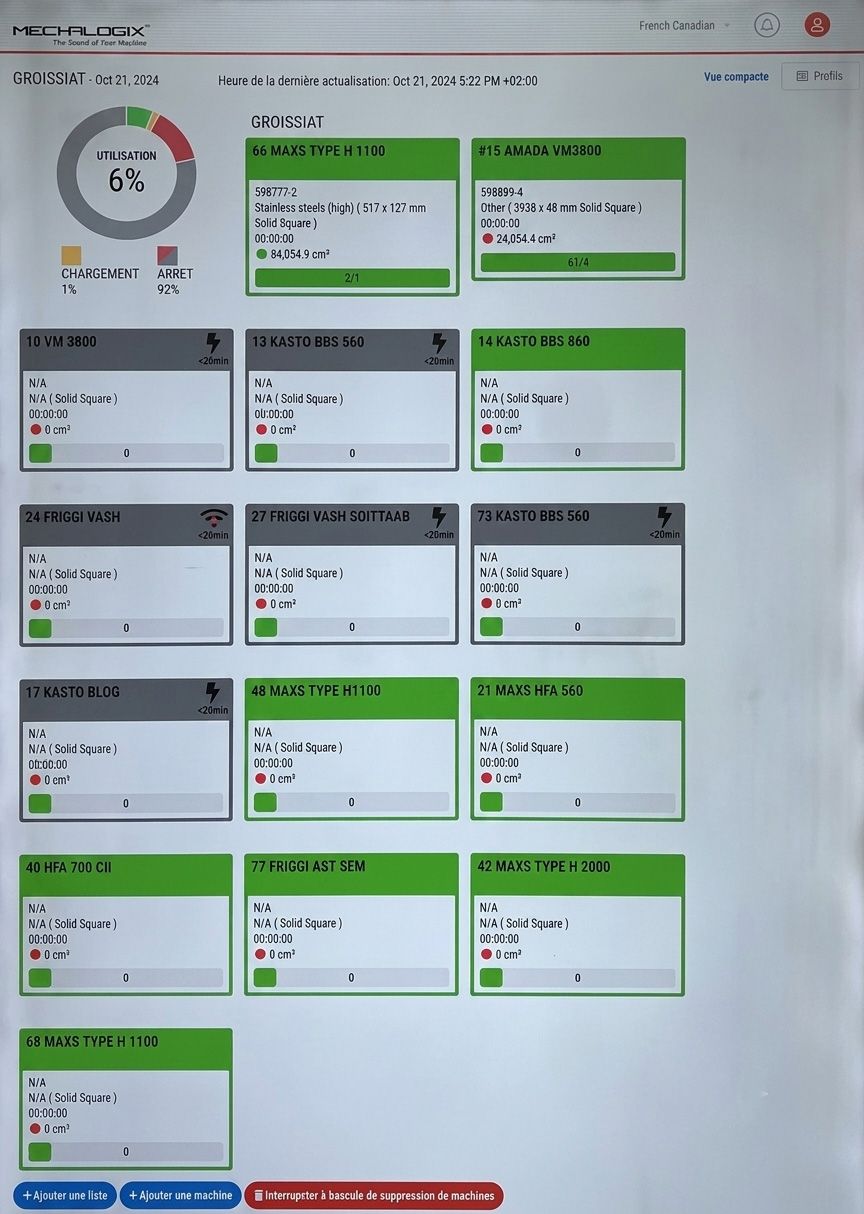
Configurable Production Content
Depending on system features and account permissions, TV dashboards can be configured to carousel the following operational insights:
- Machine Identification: Machine name, physical location, designated plant section, or specific production line grouping.
- Real-Time Operation Status: Current operating state (Cutting / Idle / Down / Offline), active Work Order (WO) number, and completion percentage.
- Key Performance Indicators (KPIs): Shift or daily cumulative utilization rate, total cut count, and active error/alarm codes. Layouts, color codes, rotation intervals, and grouping logic are defined based on project requirements and user authorization levels.
System Setup & Hardware Requirements
As an advanced visual management service, deployment requires meeting the following hardware and network infrastructure prerequisites:
- On-Site Display Hardware: Facilities must prepare commercial displays/TVs with HDMI inputs, Smart TVs with built-in web browsers, or compatible TV boxes.
- Stable Network Infrastructure: Display locations require reliable Wi-Fi or wired Ethernet connections, along with designated user access permissions. Facilities with strict corporate IT security or intranet isolation policies should coordinate deployment methods with their IT departments in advance.
- Essential Data Acquisition Hardware: While dashboards are cloud-hosted, data collection requires physical hardware. Machines must be equipped with physical Cosen data collection units (e.g., CPC-GO or CPC-LITE) to capture operational current and control signals from the shop floor, broadcasting them smoothly to the TV screens. Both new and legacy band saws can be connected using appropriate CPC hardware.
Pre-Evaluation Checklist for Inquiries
When contacting Cosen's technical and software engineering teams, preparing the following details in advance will help us design your dashboard layout and connectivity plan efficiently:
- Total quantity, make, and models of machines to be monitored and displayed on the dashboard.
- Plant grouping and dashboard display plan (e.g., separate views for Plant 1 vs. Plant 2, or Line 1 vs. Line 2).
- Number of physical TV installation locations and display hardware specifications.
- Current factory network infrastructure (wired Ethernet, Wi-Fi, or cellular network status).
- Primary KPIs to highlight on screen (e.g., utilization rate or work order progress) and preferred alert color thresholds.
- Any corporate IT security policies, firewall restrictions, or subnet isolation rules.