
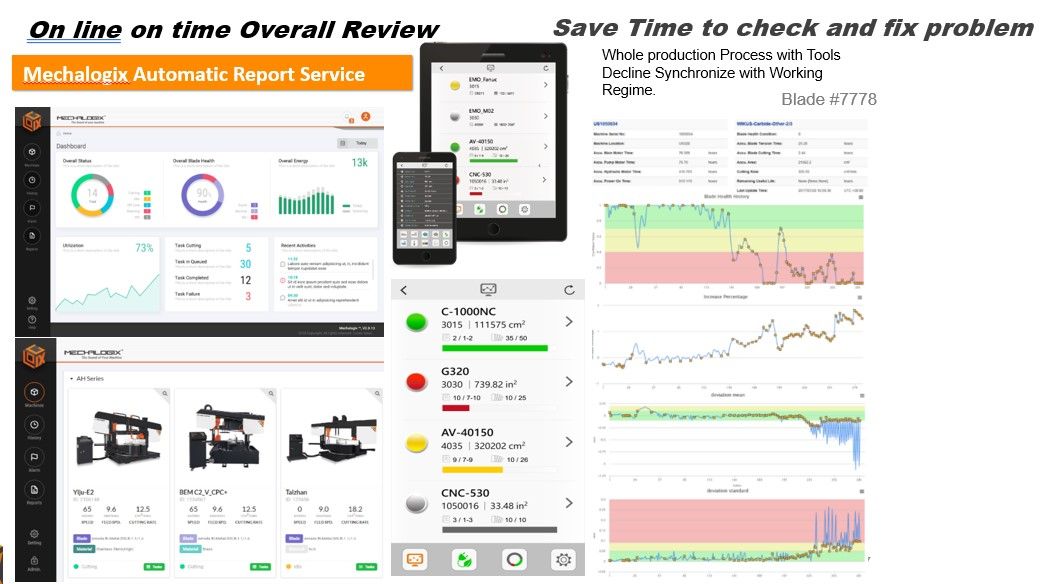
Automatic Cutting Report &Analysis
Automatic cutting report available in different options for user to choose what are most important and configure sending time
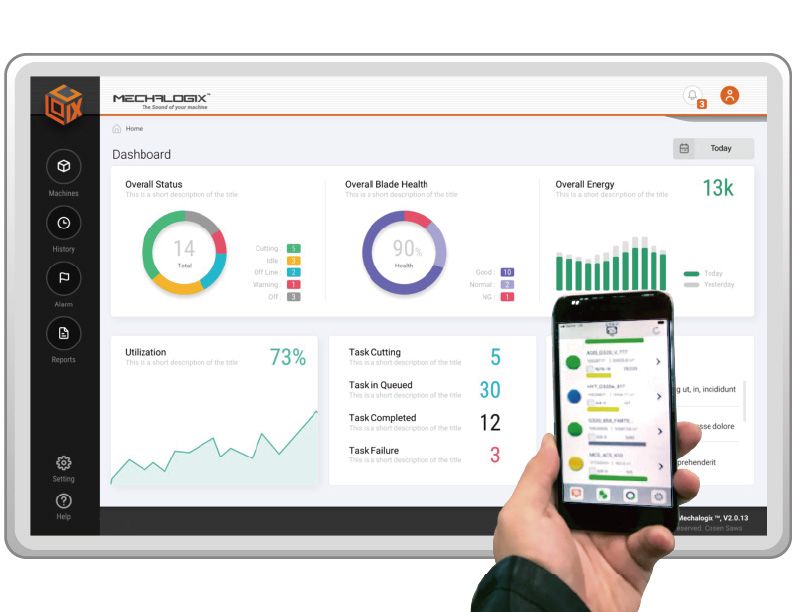
CPC Connect, Cosen’s patented cutting analytic tool, provides automatic cutting report and analysis to help you first understand how machines and blades are being used and in turn manage and optimize them. Reports can be configured to include only key data of your interests and sent at your desired timing: daily, weekly and/or monthly.
Reports come in easy-to-read real-time graphic charts for you to grasp results at a glance.
Automatic Cutting Reports and Analysis
End manual paperwork delays and drive daily shop-floor efficiency with verified analytics
Depending on the selected CPC configuration, Cosen's smart system summarizes machine running time, downtime, cutting, blade life, and work-order progress into clear, automated PDF/Excel reports. These are delivered directly to your email inbox on a daily, weekly, or monthly schedule, giving managers complete operational clarity without stepping onto the workshop floor. Available report metrics and dispatch frequencies can be configured based on user accounts and system capabilities.
Problems Solved on the Shop Floor
Operating a bandsaw fleet without automated data reporting leads to several severe operational bottlenecks:
- Delayed & Incomplete Manual Paper Logs: Relying on operators to manually track runtimes and cut counts on clipboards often results in inconsistent, late, or modified records that delay management decisions.
- Multi-Brand Data Silos: When your floor runs a mix of different equipment brands—such as COSEN, AMADA, KASTO, FRIGGI—or older legacy machines, localized communication differences make it impossible to centralize and compare utilization metrics.
- The 'Utilization Black Hole': Without continuous automated tracking, managers cannot easily identify the root causes of idle periods, machinery setup times, or sudden faults, leading to silent but expensive capacity leaks.
Three Management Roles & Applications
Tailored intelligence designed for key operational stakeholders across your organization:
- Factory Owners & Executives: Gain a high-level view of multi-site operations and overall equipment effectiveness (OEE). Easily identify bottlenecks and use real-world capacity data to support equipment ROI evaluations and accurate job pricing.
- Production Supervisors: Monitor shift-specific outputs (e.g., Day Shift vs. Night Shift), track real-time progress on specific work orders, and review detailed lists of downtime events to optimize floor scheduling.
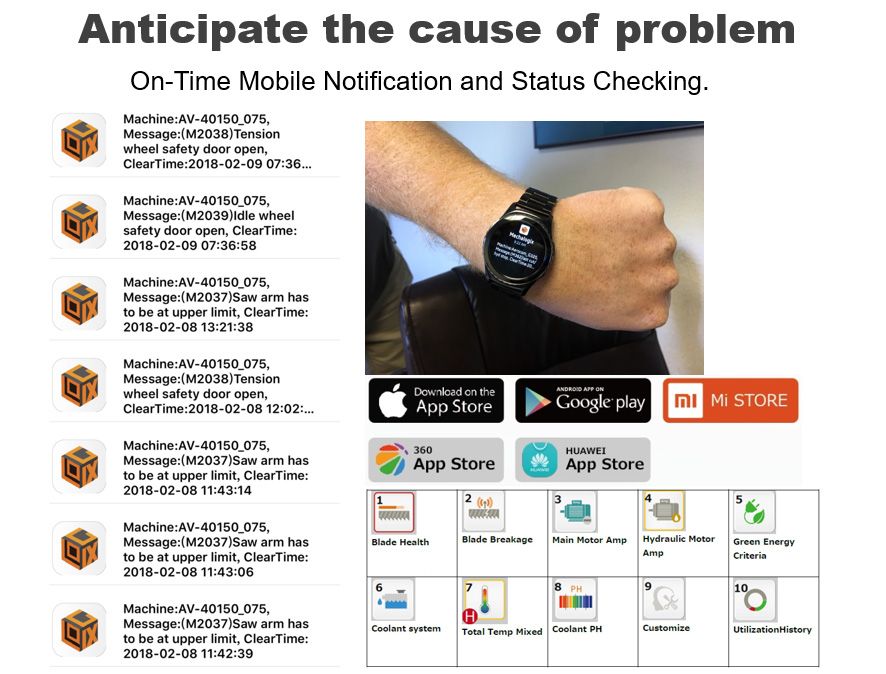
- Maintenance Teams: Use historical cumulative cutting areas and vibration trend logs to schedule proactive tool replacement and equipment servicing, preventing catastrophic blade shatters and costly emergency breakdowns.
Report Telemetry & Content
Comprehensive data collection transformed into structured visual analytics:
- Utilization Metrics: Automatically aggregates Total Running Time, Total Idle Time, Total Downtime, and Overall Utilization Rate (%).
- Work-Order Performance: Includes precise Cut Counts, active error/alarm codes, current work-order progress, and production volume logs.
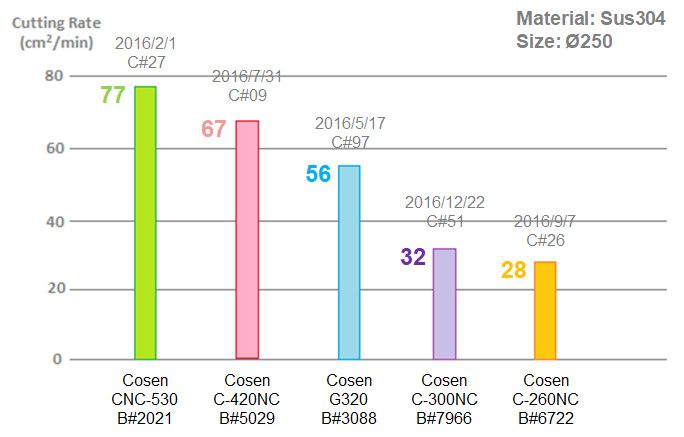
- Tool Performance & Lifecycle Analytics: Tracks cumulative cutting area, cutting loads, and vibration harmonics for each blade, allowing you to scientifically evaluate and compare the cost-performance of different blade brands.
- Technical Boundary Note on Energy & Cost Conversion: Detailed energy tracking (kWh) and job-cost calculations are strictly available when the machine is equipped with compatible power-measurement sensors and when actual utility and labor rates are pre-configured in the system database. Standard setups do not guarantee automatic financial accounting.
System Synergy & Hardware Requirements
The Automatic Cutting Reports and Analysis module represents the core software reporting engine, shift analytics, and cost auditing tools. To feed accurate physical metrics into this digital reporting system, the bandsaw machinery must be equipped with physical data collection host hardware (such as CPC-GO or CPC-LITE) to capture raw electrical signals and securely transmit them to our cloud reporting database.
Implementation Evaluation & Inquiry Guide
To help our software engineers design the optimal reporting fields and formats for your shop floor, please provide the following details when sending your inquiry:
- Your target KPIs (e.g., basic machine utilization, predictive blade lifespan tracking, or shift-specific cost estimations).
- Preferred report recipients and delivery schedule (daily, weekly, or monthly).
- Your exact workshop shift schedule breakdown.
- The brand, model, year, and total count of bandsaws to be monitored.
- The controller specification (PLC brand) and on-site network conditions (Wi-Fi or Ethernet).
- Future plans regarding data integration with your corporate ERP or MES platforms.